Using your everyday voice is perfectly fine. But for a ranked Valorant match, a Twitch stream with 500 viewers, or a VRChat session with friends across three continents, stepping into a character takes the experience to another level. Today's AI voice changers let you become any character the moment you open your mic, or transform your recorded gameplay into highly engaging content.
The technology has matured: live latency is now measured in milliseconds, voice libraries run into the hundreds of recognizable characters, and the best desktop tools leave your CPU enough headroom to actually run your game. Below is a practical guide to the best voice changers worth knowing in 2026, starting with the one that fits live gaming workflows best, and ending with the ultimate platform for high-fidelity audio processing.
What to Look For in a Real-Time Voice Changer
| What to check | Why it matters |
|---|---|
| Latency | Over 50ms sounds noticeably laggy; under 30ms feels instant |
| Voice library | More recognizable characters = better for roleplay and entertainment |
| CPU and GPU footprint | High CPU or GPU usage from a voice changer can cause game stuttering or lower frame rates during gameplay |
| App compatibility | Discord, OBS, and your game need to see it as a microphone |
| Soundboard | Meme triggers and reactions are a core part of streaming culture |
| Local processing | Keeps your audio private; no data sent to external servers |
| Free tier | Real-world testing before subscribing matters |
AI Voice Changers at a Glance
| Tool | Best For | Latency | Free Tier |
|---|---|---|---|
| Dubbing AI | Gaming + streaming, 500+ characters, near-zero system impact | <30ms | Yes (10 rotating voices/day) |
| Voicemod | Discord-centric, large community, polished UX | Not officially disclosed | Yes (limited) |
| iMyFone MagicMic | Beginner-friendly, guided setup, 500+ AI voices | Not officially disclosed | Yes (limited) |
| Clownfish Voice Changer | Free, lightweight, basic pitch shifting | Variable | Fully free |
| HitPaw VoicePea | Streamers and VTubers; 200+ AI voices + built-in soundboard, AI song covers, and noise reduction | Not officially disclosed | Yes (limited) |
| Fish Audio | Content creators, post-production, browser-based (no install) | <30s processing (File-based) | Yes |
1. Dubbing AI: Built for Gaming Culture, Not Just Voice Effects
Dubbing AI is the closest thing to a voice changer designed from the ground up for the gaming and streaming audience rather than adapted for it. The character library, the system footprint, and the soundboard integration all point at the same use case: performing live in front of people.
500+ Characters from the Games and Anime You Actually Play The library is not generic effects. Dubbing AI has built voice characters inspired by popular games and anime, including voices from League of Legends, Valorant, Fortnite, Roblox, Jujutsu Kaisen, and JoJo's Bizarre Adventure. These are voices a teammate recognizes mid-round, which is very different from sounding vaguely robotic. The library rotates new trending voices regularly, so it stays current with whatever is popular on streaming this month.
Under 30ms, Under 3% CPU This is the technical spec that matters most in gaming. Dubbing AI's processing runs entirely on CPU, consuming 2-3% of CPU resources and 0% GPU. RVC-based changers typically require dedicated GPU resources, which Dubbing AI avoids entirely. If you are streaming at 1080p while playing something GPU-heavy, Dubbing AI is designed not to show up in your performance metrics. No game audio is sent to external servers. The entire transformation happens locally on your device.
Meme Soundboard with 100,000+ Community Sounds Beyond voice transformation, the soundboard is a standalone streaming tool. Sounds are organized by category (Memes, Games, Anime, TikTok, SFX) and the community uploads new content continuously. Triggering a well-timed meme sound can be one of the biggest engagement moments in a stream, and having both in one tool keeps your setup clean.
Works With Everything Discord, Zoom, OBS, Steam, League of Legends, Valorant, CS2, Fortnite, Roblox, VRChat, WhatsApp, Apex Legends, PUBG, Lethal Company. Setup is the same for all of them: select "Dubbing Virtual Device" as your microphone input in the app's audio settings, and the transformation is live. Installation takes under five minutes.
Ecosystem Add-ons For IRL streamers or phone gamers who want voice changing outside of a PC setup, Dubbing Box is a hardware accessory that connects to your smartphone and extends the pipeline to mobile.
Additionally, Dubbing AI's companion tool Utell handles real-time accent conversion to standard English, perfecting clarity for calls, meetings, and streaming.
Free Tier and Pricing Free plan includes 10 rotating voices daily plus 5 daily mystery voices. Paid subscription unlocks the full 500+ character library. Pricing is available at dubbingai.io.
2. Voicemod
Voicemod is the most recognized name in PC voice changing. It has been purpose-built for Discord and game chat for years, which shows in how seamlessly it integrates with every gaming platform and communication app on the market. The core voice changer runs at impressively low latency, and the community voice creator ecosystem means new effects appear regularly. The free version is functional but limits you to a rotating set of voices; the Pro subscription opens the full catalog and custom voice slots. Where Voicemod trails Dubbing AI: the anime and game character library depth, the community soundboard scale, and the CPU footprint at comparable settings. Where it wins: brand recognition in gaming circles and a marginally simpler onboarding experience for people who have never used a voice changer before. Because of its strong integration with communication apps like Discord and a large user base, Voicemod is a standard choice if you are looking for an established community platform.
3. iMyFone MagicMic
MagicMic leans into accessibility. The interface is the most guided of any tool on this list: voice categories are clearly labeled, setup walks you through input/output configuration, and there are enough presets to get something usable in under two minutes. Paid plans unlock 300+ AI voice models (500+ in the full library) — not as deep as Dubbing AI on gaming-specific characters, but broad enough for most casual use cases. It supports Discord, Zoom, OBS, and the major game platforms. MagicMic starts at $9.99/month, with steeper annual discounts. It is the sensible pick if you are new to voice changers and want something approachable before committing to a more character-specific tool.
4. Clownfish Voice Changer
Clownfish is the no-configuration option. It has been free since it launched, runs on Windows, and installs at the system level so it works with any application that uses a microphone. The trade-offs are obvious: no AI-based character voices, a basic sound player but no meme-library soundboard, and the pitch-shifting effects sound processed rather than performed. Clownfish installs at the system level and offers basic pitch-shifting effects. It is a lightweight, free option for users who want simple, system-wide voice modifications without complex configurations. (Windows only. If you are on macOS, look elsewhere.)
5. HitPaw VoicePea
HitPaw VoicePea offers 200+ AI voice models in a package that runs on both Windows and macOS — a meaningful distinction in a category that skews heavily Windows. Setup follows the same virtual microphone approach as the rest of this list: select the HitPaw virtual device as your input in Discord, OBS, or your game client and voice changing is live. The feature set goes further than the core voice changer. There is a built-in soundboard, a file voice changer for processing recorded audio, and AI cover song generation — more utility than most single-purpose tools in this category offer. If you are after voice variety for general use rather than a specific game or anime aesthetic, the 200+ general AI voices cover that range well. If character fidelity to a specific title is the point, Dubbing AI is the better call.
Fish Audio: Transform Your Voice in Seconds Without Installation
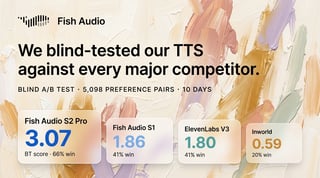
Fish Audio's Voice Changer is built for creators who work with audio files. Upload a clip, choose from 2,000,000+ community voice models — or bring your own reference audio — and most clips come back transformed in under 30 seconds. Your original timing, emotion, and delivery are preserved; only the voice changes. The Upload Reference option is the standout feature: rather than picking from a preset menu, you can supply any short audio clip of a voice you want to sound like, and the AI converts to it. That's particularly useful for gameplay commentary, podcast post-production, dubbed content, or character voices. It's browser-based, requires no software installation, has a free tier, and works across English, Chinese, Japanese, and more.
Which AI Voice Changer is Right for You?
- Live gaming (Valorant, LoL) & Discord — want character voices: Dubbing AI.
- Streaming on Twitch and want both voice change and a meme soundboard in one tool: Dubbing AI.
- Already in a Discord group running Voicemod, want to fit in without switching: Voicemod.
- New to voice changing, want a guided setup: iMyFone MagicMic.
- Basic pitch effects for free, Windows only: Clownfish.
- Want 200+ AI voice models without the gaming-specific catalog: HitPaw VoicePea.
- Editing recorded videos or podcasts — want studio-quality voice conversion in your browser: Fish Audio.

Kevin Young
As part of the digital marketing team, Kevin focuses on industry partnerships, highlighting guest content, and sharing cutting-edge tools for creators.
Kevin Youngの他の記事を読む