How to Use Inline Tags in Fish Audio S2
Mar 10, 2026

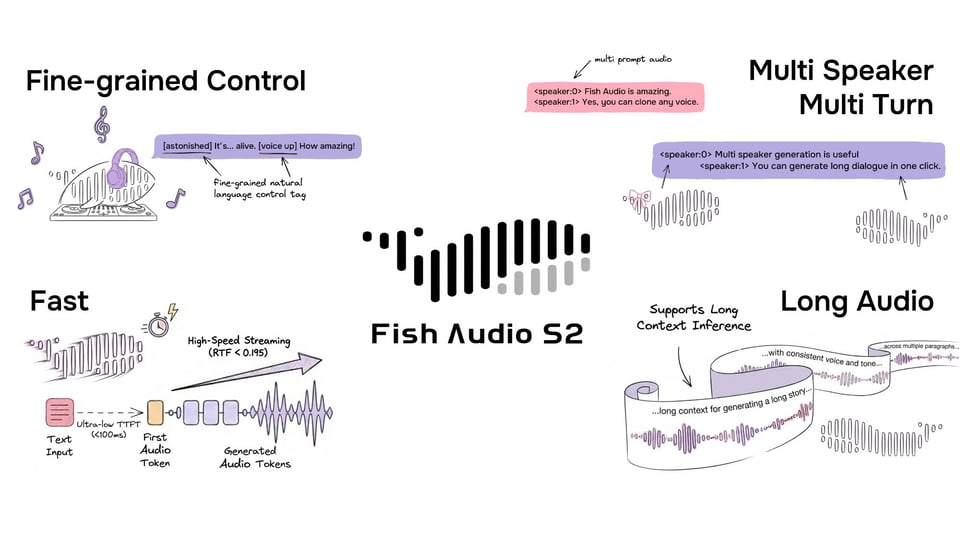
Fish Audio S2 supports inline tags - short natural-language cues placed in square brackets anywhere in your text — to control how speech is delivered. This guide covers the supported tags, how to use them, and tips for getting the best results.
Basic Syntax
Place a tag in square brackets immediately before the word or phrase it should affect:
The door was open. [whispering] I didn't want to go inside.
Tags can be placed at any position in the text, and you can use multiple tags in a single generation.
Recommended Tags
S2 accepts free-form natural-language tags — you're not limited to a fixed list. That said, the tags below are well-tested and produce consistently strong results. Use them as starting points, or write your own descriptions (e.g. [speaking slowly, almost hesitant]) for more specific control.
Breathing & Vocal Reactions
| Tag | Description |
|---|---|
[clears throat] | Throat-clearing sound before speaking |
[inhalation] / [inhale] | Audible breath in |
[exhale] | Audible breath out |
[sigh] | Expressive sigh |
[panting] | Heavy, rapid breathing |
[breathing] | General audible breathing |
[gasp] | Sharp, sudden intake of breath |
Vocal Sounds
| Tag | Description |
|---|---|
[groan] | Low sound of discomfort or exasperation |
[moaning] | Extended vocal sound of pain or displeasure |
[sobbing] | Crying with convulsive breaths |
[crying] | Audible tears in voice |
[laughing] | Full laughter |
[chuckling] | Soft, quiet laughter |
[giggle] | Light, high-pitched laughter |
Pacing
| Tag | Description |
|---|---|
[pause] | Brief silence |
[short pause] | Shorter beat |
[long pause] | Extended silence for dramatic effect |
Voice Style
| Tag | Description |
|---|---|
[whispering] / [whispering voice] | Hushed, breathy delivery |
[soft voice] | Quiet and gentle |
[low voice] | Deeper, lower-pitched register |
[loud voice] | Raised volume |
[shouting] | Full-volume yelling |
Emotion
| Tag | Description |
|---|---|
[excited] | High energy, upbeat |
[angry] | Harsh, forceful tone |
[sad] | Heavy, downcast delivery |
Other
| Tag | Description |
|---|---|
[emphasis] | Stress on the following word or phrase |
[rustling sound] | Background rustling noise |
Placement
Tags affect what comes after them. Place the tag right before the point where you want the shift to happen.
Good — tag at the transition point:
I thought everything was fine. [whispering] Then I heard the noise.
Less effective — tag too early:
[whispering] I thought everything was fine. Then I heard the noise.
In this case the entire passage will be whispered, including the first sentence.
Combining Tags
You can chain multiple tags across a passage to create shifts in delivery:
[soft voice] I wasn't sure what to say. [long pause] [loud voice] But then it hit me.
Vocal reaction tags can be placed between sentences for natural-sounding transitions:
That was the third time this week. [sigh] I really need to fix that.
Multi-Speaker Dialogue
S2 supports multi-speaker, multi-turn generation with per-speaker inline tag control. Multi-speaker is coming soon to the Fish Audio playground and API — stay tuned.
Tips
Start simple. A single well-placed [whispering] or [sigh] can transform a passage. You don't need a tag on every sentence.
Use pauses for pacing. [pause] and [long pause] are among the most useful tags for making speech feel natural, especially before emotional shifts.
Let reactions carry emotion. Instead of relying on emotion tags alone, try combining with reactions: [sigh] [sad] I just don't know anymore. The sigh grounds the emotion physically.
Test and iterate. Different voices may respond to tags with varying intensity. If a tag feels too subtle, try reinforcing it with context in the surrounding text.
Links
- Demo → fish.audio
- GitHub → github.com/fishaudio/fish-speech
- HuggingFace → huggingface.co/fishaudio/s2-pro