How to Start a Faceless YouTube Channel Using AI Voice (Step-by-Step Guide for 2026)
Feb 19, 2026
 hehe6z, Applied AI ResearcherTutorial
There are YouTube channels with millions of subscribers where the creator has never shown their face.
Before AI, starting a YouTube channel meant recording everything yourself, learning to edit from scratch, and spending hours - sometimes days - finishing a single video. Scaling was painful. Once you tried posting more consistently, the bottleneck became you.
Even after hiring editors and researchers, one thing couldn’t scale: your voice. The entire brand was built around it, and biology set the limit.
It’s 2026. That’s no longer true.
With modern AI voice tools, you can start a faceless YouTube channel that scales without sitting behind a microphone every day. This guide shows you how to launch a high-quality, search-driven faceless YouTube channel using AI voice — without sounding robotic and without falling into low-effort automation traps.
What Is a Faceless YouTube Channel?
A faceless YouTube channel is one where the creator does not appear on camera. The identity of the channel is built around:
- Voice
- Storytelling
- Editing style
- Topic authority
Some large examples of narration-driven channels:
-
rSlash – Reddit stories with voice narration (1.87M subscribers at the time of writing this article)
-
Kings and Generals – documentary-style historical storytelling (4.09M)
-
Daily Dose of Internet – curated clips with narration (20.7M)
Different niches. Same pattern.
In this article, we’ll break down how it works, and build a practical, step-by-step playbook you can actually follow. If you don’t know me, I’ve built creative AI platforms like OpenArt, and I’m also a YouTuber myself. You can check out my personal channel here. I’ve grown another channel to 300K subscribers in under two years and have launched multiple channels across different niches.
I’ve done YouTube the pre-AI way - recording everything myself, editing late into the night, manually grinding each upload. And I’ve adapted early to AI-driven workflows as the tools matured. I’ve experienced the bottlenecks firsthand and rebuilt the system around what actually scales today. So let’s break it down properly!
Why YouTube Is Perfect for Faceless Channels
You might be thinking — why not TikTok? Why not Instagram Reels?
There are two big reasons.
1. YouTube Is Search-Driven
Unlike purely algorithmic short-form platforms, YouTube is both recommendation-driven and search-driven.
People actively search for:
- “Best business books explained”
- “Reddit AITA stories”
- “How inflation works”
- “What if the US invaded Japan?”
- “History documentary about Rome”
That means your videos don’t just live and die in a 24-hour algorithm cycle. If your video answers a question clearly and professionally, it can generate traffic for years. Search traffic compounds. For a faceless channel, this is massive.
2. YouTube Monetization Is More Predictable
On YouTube, revenue is directly tied to:
- Watch time
- Session duration
- Ad placements
- Evergreen views
Long-form videos (8–15 minutes) still generate some of the best creator economics online. When your channel is built around voice and storytelling instead of your face, YouTube becomes a system, not a performance.
Step 1: Pick a Narration-Friendly Niche
The first rule: Audio is the core value of your video. Visuals exist to support, clarify, and keep attention.
When you build your channel this way, you focus on creating high-quality storytelling through voice first, then layer visuals around the audio to reinforce the narrative. This approach makes your channel easier to scale, and you can optimize the most important part of the experience: what people hear.
Strong niches for faceless YouTube channels usually share one thing in common: they’re narration-driven. Here are a few that work especially well:
1. Storytelling & Audio-Driven Narratives
- Fictional audio dramas
- Reddit stories
- Internet mysteries
- Documentary-style deep dives
These formats rely on tension and pacing in the script. The visuals amplify the emotion, but the voice carries it.
2. Business & Tech Explainers
- Startup breakdowns
- Industry deep dives
- “How X actually works”
- Market analysis
If you can explain complex ideas clearly, this niche compounds through search traffic and evergreen views.
3. Journaling & Thought Essays
- Reflections on trends
- Philosophical takes
- Personal insights narrated over visuals
This style builds slower but creates strong authority if your thinking is sharp and consistent.
Step 2: Build a Repeatable Video Structure
If you want to scale a faceless YouTube channel, you cannot treat every upload like a completely new creative experiment. That’s how you burn out. That’s how production becomes unpredictable. And that’s how consistency dies.
From day one, you need to think in terms of format. A format reduces decision fatigue. A format makes production faster. A format makes scaling realistic. Instead of constantly asking “What video should I make next?” you’re simply filling in a proven structure.
A strong faceless YouTube structure usually follows four phases:
Hook (0–20 seconds)
Start with tension, not context.
Bad: “Today we’re talking about…”
Better: “This invasion plan was going to kill half a million people.”
The hook isn’t an introduction. It’s a promise. It signals that something meaningful is coming and that the viewer should stay.
Context (1–2 minutes)
After the hook, you orient the viewer.
What is happening?
Why does it matter?
What are we looking at?
This section should be clear and efficient. No rambling. Just enough information so the audience can follow what comes next.
Escalation
This is where retention is built.
Increase the stakes and tighten the pacing.
For example:
“Picture the shoreline at dawn. Thousands of ships. Engines humming.”
The narration itself should guide the visuals. If your script is strong, editing becomes much easier because the structure is already embedded in the writing.
Resolution or Cliffhanger
End deliberately.
Either deliver a clear payoff or leave the audience with a strong, thought-provoking question. Don’t let the video drift to a soft ending. The final impression matters.
When you think in beats instead of random paragraphs, your channel becomes structured instead of chaotic. And once you lock in that structure, scaling becomes realistic, because you’re no longer rebuilding the entire system every time you upload.
Step 3: Write Scripts for Voice, Not for Reading
This is where most faceless channels either become cinematic or fall apart. When people read, they can handle long sentences and dense structure. When they listen, they need clarity, rhythm, and breathing room. If your script feels like an essay, your video will feel heavy.
Your script has to sound natural when spoken. So write for the ear.
Rules:
- Short sentences. They’re easier to follow and create momentum.
- Natural breaks. Add pauses, beats, even subtle sound cues when appropriate.
- Keep the language simple and conversational. You can use technical terms if your niche requires it, but the surrounding structure should still feel human and fluid.
- Use rhythm intentionally. Arrange sentences to build tension and release it. A short line followed by another short line creates urgency. A slightly longer sentence can provide explanation and relief.
For example, instead of writing:
“In July of 1945, the United States began to consider a full-scale invasion of Japan, which would have required…”
Try:
“July 1945. The war in Europe is over. But in the Pacific, it’s about to get worse.”
That rhythm creates energy. It feels deliberate. It keeps retention high because the audience never feels overwhelmed.
You can absolutely use AI tools to help outline or draft your script. But the draft is not the final version. You still need to rewrite for tone, pacing, and flow. Read it out loud. If you stumble while reading it, your audience will struggle listening to it.
Step 4: Use AI Voice the Right Way
This is the leverage layer, and it’s the part you should spend the most time getting right.
1. Pick the Right Tool
At its core, you need a strong text-to-speech (TTS) model.
If you’re technical, you can explore open-source models or build custom pipelines using APIs. That route can reduce cost at scale and give you more control. But it also requires engineering effort.
If you want to move fast, browser-based platforms are usually the most practical starting point.
A few commonly used options:
- Fish Audio – Strong in expressive, controllable speech. Designed with content creation in mind, including emotional range and a built-in studio workflow.
- ElevenLabs – Known for clean, stable, studio-style narration with strong clarity.
- Speechify – Popular for accessibility and reading use cases, with straightforward voice generation.
Key questions to ask when choosing the right tool:
- Does it support emotional variation, or does everything sound flat?
- Can I control pacing, tone, or delivery style?
- Does it handle long-form scripts reliably without glitches?
- Is it stable enough for consistent weekly uploads?
- Are commercial usage rights clear and safe for monetization?
- And just as importantly — is the pricing sustainable for my production schedule?
If you’re planning to upload once a month, almost any pricing tier works. But if your goal is one video a week or more, you need a cost structure that makes sense long term. Otherwise, scaling becomes financially stressful.
For documentary-style, storytelling, or narrative YouTube content, expressiveness and control matter more than pure technical fidelity. A voice that sounds “perfect” but flat won’t hold attention for 10 minutes.
The best tool is the one that fits your workflow and your format. Test a few. Generate the same 30-second script on each. Listen with headphones. Pay attention to pacing, breath realism, and how natural the transitions feel. This decision affects your entire channel identity, so choose deliberately.
2. Choose a Voice That Fits Your Topic and Vibe
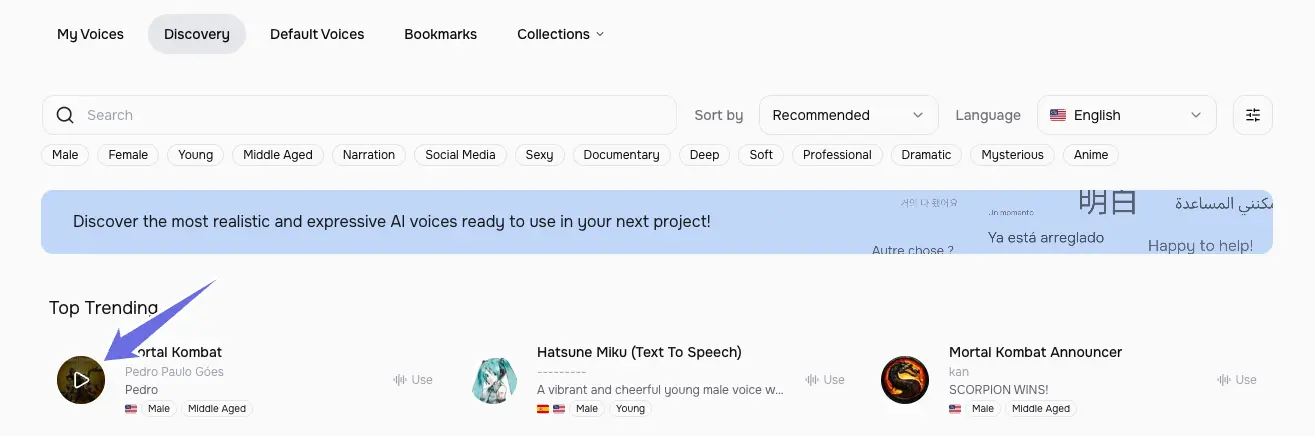
Most TTS platforms have a discovery page where you can browse available voices and listen to default samples. Once you find a voice that sounds promising, generate a short test script using your actual content.
Listen carefully. Imagine it inside your finished video. Does it feel credible? Does it match the emotional tone of your niche? Could you listen to this voice for 10 minutes straight without fatigue?
Depending on your format, you might even prepare multiple voices (e.g. narrator + character dialogue, or host + guest) to create a multi-speaker effect for richer storytelling or podcast-style content.
On Fish Audio for example, they have a discovery page of over a million voices, and you can preview each voice directly by clicking on the voice card:
When choosing a voice, alignment matters. If you’re building a serious documentary channel, don’t pick a sarcastic or overly playful tone. If you’re running a motivational channel, don’t choose a flat monotone delivery. The voice should reinforce the emotional expectation of your audience.
Before committing, always check commercial usage rights. Make sure the voice is cleared for monetized content in your region. Some platforms clearly label which voices are safe for commercial use under subscription plans. Read the terms once, so you don’t have to worry later when your channel grows.
Pro Tip: Go Beyond Preset Libraries
Sometimes the perfect voice isn’t in the default library. That’s where voice cloning or voice design comes in.
With voice cloning, you upload an audio sample of your own voice (or one you legally have rights to use), and the system creates a model that can generate speech in that tone. This is powerful if you want a fully unique and consistent brand voice.
With voice design, you describe the kind of voice you want in text, For example, “calm mid-30s documentary narrator with subtle gravitas”, and the tool generates a custom voice based on that description.
The quality of these features varies by platform. Some require longer audio samples for accurate cloning. Others focus more on speed. Voice design systems differ in how precisely they interpret descriptive prompts. But once you experiment a bit, the workflow becomes intuitive. For a deeper comparison of voice cloning tools and how they differ technically, you can read this guide:
The Complete Guide to AI Voice Cloning in 2026: Top Tools & Techniques
Once you’ve chosen your voice, stay consistent. Don’t change voices every few uploads just because something new looks interesting. Consistency builds recognition. Recognition builds trust. And in a faceless YouTube channel, your voice is your identity.
3. Fine-tune your script to the model/tool you choose
Different text-to-speech models have different traits and personalities. Knowing them well will help level up your content creation.
Take Fish Audio as an example, it provides emotion control through tags. By making use of those, you can get natural and expressive delivery that sets you apart from other channels that sound just robotic and hard to follow.
For example, putting “(excited) Wow! This is absolutely amazing!” will do better than “Wow! This is absolutely amazing!”
4. Polish the flow for longer content
When you’re working on longer YouTube videos, flow becomes extremely important. Pauses, breaks, and rhythm all play a huge role in the coherency of your video. If everything sounds like one continuous block of speech, your audience will fatigue quickly.
Some platforms provide features that make this easier to manage. For example, Fish Audio’s Studio feature allows you to generate long-form audio by breaking the script into blocks. This means you can tune each section individually instead of regenerating the entire script every time one paragraph feels slightly off. You also get a timeline view, which helps you visualize pacing, insert pauses intentionally, and manage multiple speakers when needed.
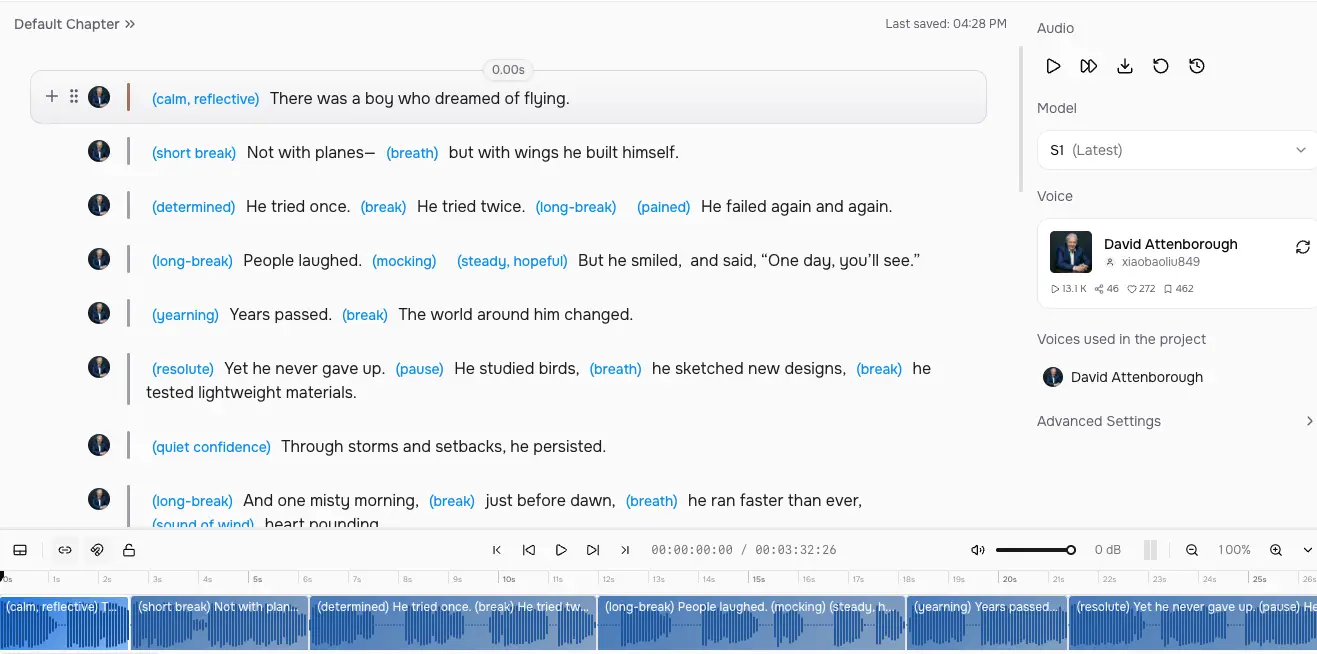
That kind of control is especially useful for documentary-style or narrative content where timing and transitions matter.
At the same time, be patient. AI makes production faster, but there’s always some randomness in the generation process. Sometimes a paragraph needs two or three attempts before it lands with the right tone and pacing. That’s normal. The difference between a “good enough” faceless channel and a premium one often comes down to that extra round of polishing.
Step 5: Create Visuals That Support the Narration
At this point, your narration is doing the heavy lifting. The visuals exist to support, not compete with it. Here are a few effective approaches. You can experiment and mix depending on your niche and production style.
1. Stock Footage Libraries
Stock footage is the fastest way to make your videos look professional without building everything from scratch.
For documentary, business, or explainer channels, clean B-roll works extremely well — city skylines, office scenes, historical imagery, subtle motion shots, abstract textures. The key is to match visuals tightly with what your narration is describing at that moment.
One simple site to get started with is: Pexels Videos
It offers free stock footage that works well for many niches. If you scale up later, you can explore premium libraries for higher-quality or more specific clips.
Tips:
- Use slow zoom-ins or slight motion to avoid static frames.
- Keep cuts aligned with sentence breaks.
- Avoid overusing flashy transitions — subtle feels more premium.
2. Infographics
Infographics are especially powerful for business, tech, finance, and educational content. If your narration explains systems, numbers, or comparisons, visualizing them dramatically increases retention. You don’t need complex motion graphics. Clean, readable visuals are enough.
A beginner-friendly tool for creating infographics and simple animated visuals is: Canva
3. AI-Generated Scenes
If you want more cinematic or highly customized visuals, AI-generated scenes can be extremely powerful. This works especially well for concept visuals, fictional scenarios, dramatic storytelling - especially the ones involving characters. Instead of searching endlessly for stock clips, you generate scenes tailored exactly to your script.
For example, OpenArt allows you to generate custom visuals aligned with specific story moments.
The advantage here is precision. If your script says, “A fleet gathered at dawn under heavy fog,” you can generate exactly that.
A faceless YouTube channel gives you leverage.
You get to build an asset that can generate views, income, and authority without tying it to your face. You can test niches faster, publish more consistently, and scale aggressively. Done right, you’re letting system work for you.