Fish Audio S2! Fine-Grained AI Voice Control at the Word Level
Mar 12, 2026

Fish Audio S2 brings open-domain inline tags, word-level AI voice control, and 80-language support to expressive TTS. See how it works with real examples.
March 2026 | Fish Audio S2 is now available
Table of Contents
-
What Is Fish Audio S2?
-
What S2 Can Do — In 30 Seconds
-
Inline Tags in Fish Audio S2
-
Real Examples
-
How S2 Performs — Benchmark Results
-
80 Languages
-
Open Source
-
How to Get Started
-
FAQ
Most AI voice tools give you a voice and let you adjust the mood at the global level — calmer, more energetic, a bit warmer. Fish Audio S2 takes a different approach to expressive TTS. You direct the voice at the word level, in plain language, right inside your script. If you're familiar with Fish Audio emotion tags in S1, S2 expands that idea dramatically with open-domain inline control.
This is what that looks like in practice:
I thought I was ready. [voice breaking] I wasn't.
[soft voice] Take your time. There's no rush.
That was the third time this week. [sigh] I really need to fix that.
No settings panels. No SSML. No post-production. You write the direction into the text, and S2 renders it.
Quick Summary
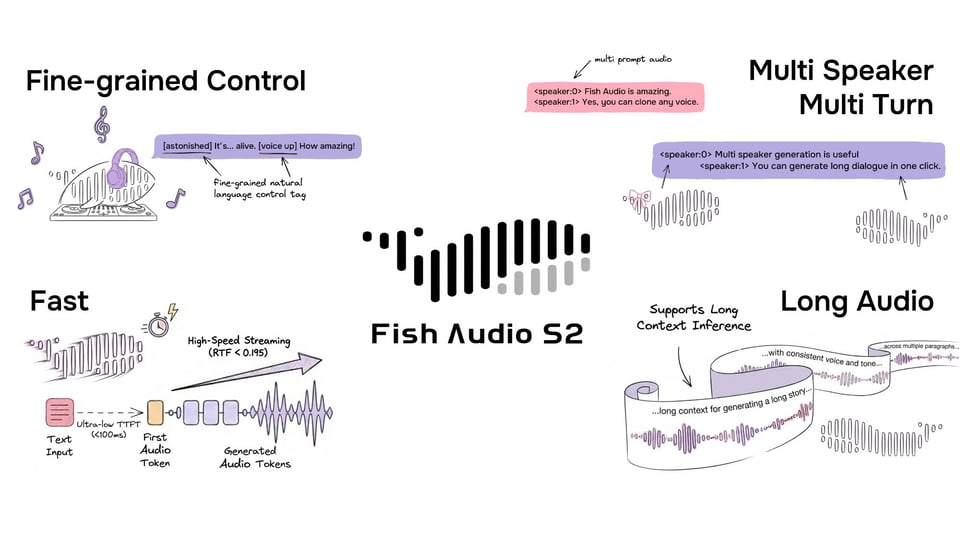
Fish Audio S2 introduces inline tags for expressive TTS control at the word level.
-
Open-domain tags written in natural language — no fixed vocabulary
-
Mid-sentence placement for precise timing and delivery shifts
-
Support for approximately 80 languages
-
Open-source model weights, fine-tuning code, and inference stack
Instead of adjusting global voice settings, S2 lets you direct delivery directly inside your script.
What Is Fish Audio S2?
https://www.youtube.com/watch?v=NIcXTOSdOXc
Fish Audio S2 is the second-generation TTS model from Fish Audio. It's trained on over 10 million hours of audio across approximately 80 languages, and it introduces inline tag control: natural-language instructions embedded directly in your script at any position, giving you fine-grained direction over how speech is delivered at the word or phrase level.
The model is open-sourced on GitHub and HuggingFace, and is available via the Fish Audio API and APP.
What S2 Can Do — In 30 Seconds
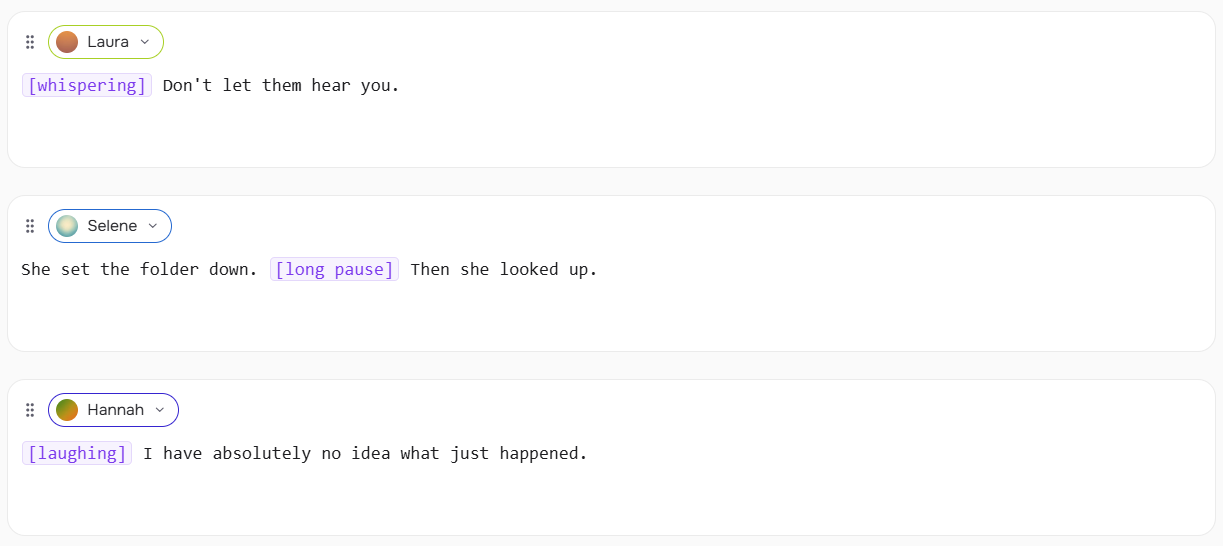
S2's inline tags are square-bracket instructions placed anywhere in your text:
[whispering] Don't let them hear you.
She set the folder down. [long pause] Then she looked up.
[laughing] I have absolutely no idea what just happened.
Tags affect what comes after them. Place the tag at the exact point where the shift should happen — not at the start of the sentence unless that's where you want it.
You're not choosing from a fixed menu. You write the description, and S2 interprets it:
[the calm, measured tone of someone who has done this a thousand times]
Please place your hands where I can see them.
[overly cheerful, clearly forcing it]
Everything is completely fine. Totally fine.
If you can describe it to a voice actor, S2 can attempt it.
Inline Tags in Fish Audio S2
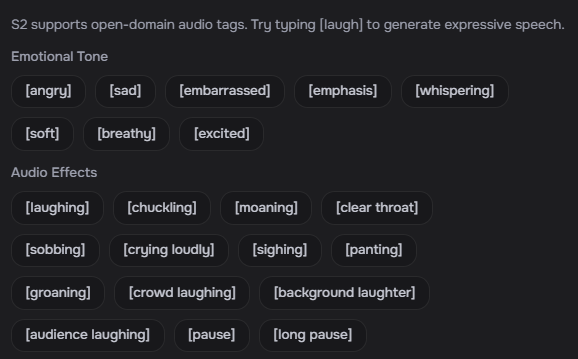
Inline tags are the core control mechanism in Fish Audio S2. They're natural-language instructions in [square brackets] that you embed directly in your script to direct how speech is delivered — at any word, at any point.
Syntax
Place a tag in [square brackets] immediately before the word or phrase it should affect. Tags can go anywhere — start, middle, or end of a sentence.
[whispering] I didn't want to go inside.
I didn't want to go [whispering] inside.
Both work. The first whispers the entire line. The second whispers from "inside" onward. Placement is meaning.
Write Tags in Your Language
Tags don't have to be in English. S2 understands natural-language instructions across 80 languages — so you can write tags in the same language as your script.
日本語 (Japanese)
[囁き声で] 誰にも聞かせないで。
[ため息をついて] もう一度やり直そう。
中文 (Chinese)
[低声说] 不要让他们听见。
[叹气] 我真的不知道该怎么办了。
español (Spanish)
[susurrando] No dejes que te escuchen.
[enojado] ¿Cómo pudiste hacer eso?
한국어 (Korean)
[속삭이며] 아무도 모르게 해줘.
[화나서] 어떻게 그럴 수가 있어.
The same logic applies: place the tag immediately before the word or phrase it should affect, in whatever language feels natural for your script.
Well-Tested Tags
S2 accepts any natural-language description, but these tags consistently produce strong results out of the box. Tags apply from the point they appear until the next tag or end of the sentence.
Breathing & Reactions
Vocal Sounds
Pacing
Voice Style
Emotion
Other
Free-Form Descriptions
Beyond the tag list above, S2 accepts open-ended descriptions. Write what you'd tell a voice actor:
[speaking slowly, almost hesitant]
[professional broadcast tone]
[dead tired, end of a very long shift]
[pitch up]
[voice rough from crying, trying to sound normal]
Because S2 is trained on open-ended descriptions, novel tags generalize well — you're not limited to examples seen during training.
Combining Tags
Chain tags across a passage to create shifts in delivery:
[soft voice] I wasn't sure what to say. [long pause] [loud voice] But then it hit me.
Use reaction tags between sentences for natural transitions:
That was the third time this week. [sigh] I really need to fix that.
Combining a reaction with an emotion tag grounds the feeling physically:
[sigh] [sad] I just don't know anymore.
Real Examples
Audiobook Narration
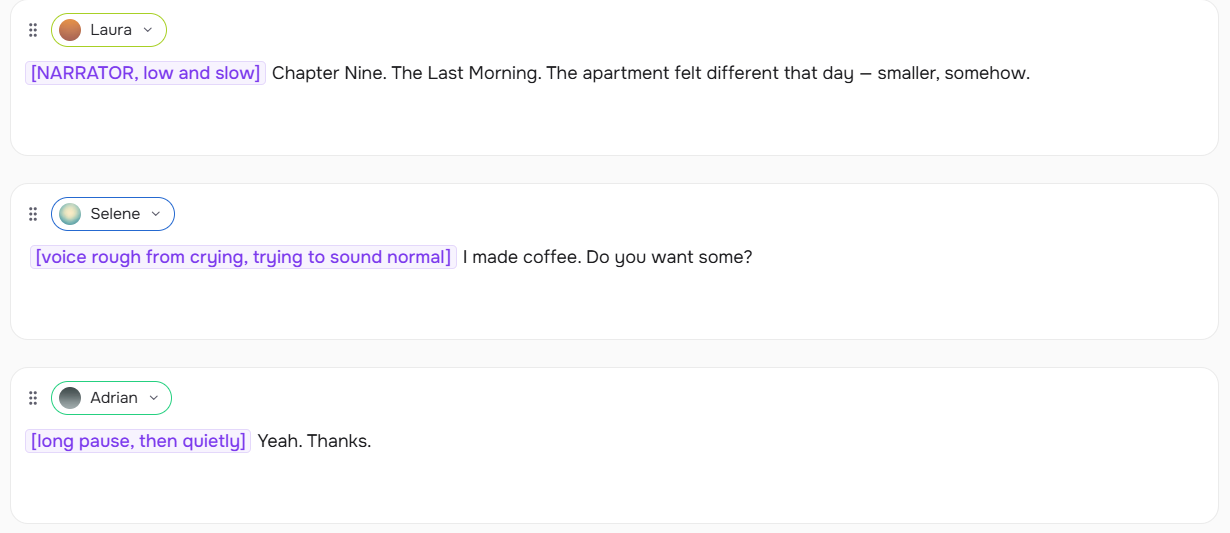
[NARRATOR, low and slow] Chapter Nine. The Last Morning. The apartment felt different that day — smaller, somehow.

SARAH: [voice rough from crying, trying to sound normal] I made coffee. Do you want some?

DANIEL: [long pause, then quietly] Yeah. Thanks.
Podcast

Today we're looking at something I've spent three months trying to understand.

[chuckling] I kept getting it wrong. My producer will confirm this.
Game Dialogue
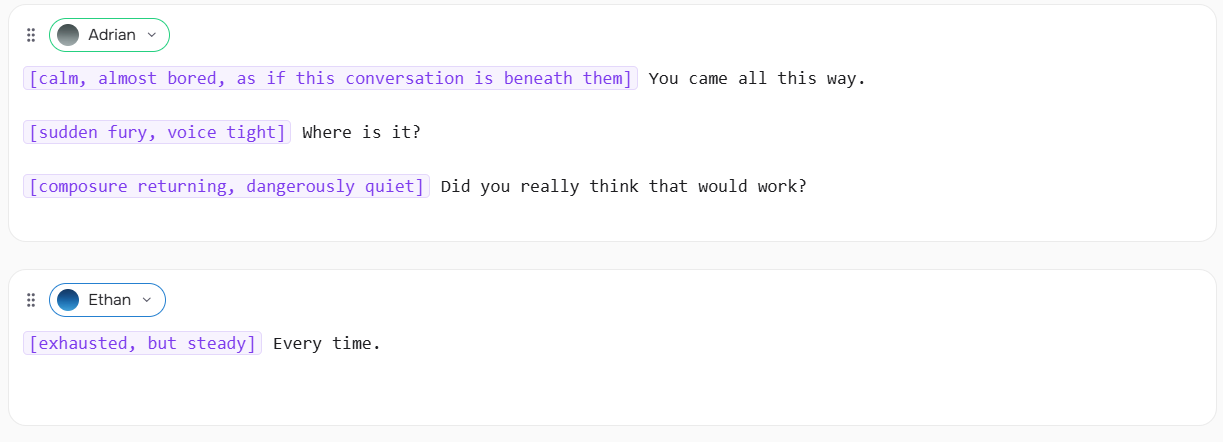
VILLAIN: [calm, almost bored, as if this conversation is beneath them] You came all this way.

VILLAIN: [sudden fury, voice tight] Where is it?

VILLAIN: [composure returning, dangerously quiet] Did you really think that would work?

HERO: [exhausted, but steady] Every time.
Voice Agent

[friendly, warm] Hi — thanks for calling. How can I help you today?

[empathetic, unhurried] I'm sorry to hear that. Let me pull this up.

[confident] Good news — I can see exactly what happened, and I'm going to get this sorted for you right now.
Tips for Getting the Best Results
S2's inline tags are expressive, but how much they show depends on how you use them — and which voice you're working with. These tips are based on hands-on testing.

Pair physical tags with an emotion tag. Tags like [panting], [whispering], and [shouting] will register on their own, but the effect can feel flat without emotional context. Combining them with an emotion tag produces more consistent, natural-sounding results:
[panting] [tired] I've been running for twenty minutes.
[whispering] [scared] Don't move. Don't make a sound.
[shouting] [angry] I told you this would happen!

Always follow a descriptive tag with text. A descriptive tag like [voice rough from crying, trying to sound normal] needs a line to speak — don't leave it on its own. The tag directs the delivery of what follows; without text after it, output can be unpredictable.
✅  [voice rough from crying, trying to sound normal] I made coffee. Do you want some?
❌  [voice rough from crying, trying to sound normal]
Test your voice before scripting. Different voices respond to the same tag with different intensity. A voice with a naturally calm register will show subtler changes than an expressive one. If a tag isn't landing the way you expect, try a different voice before adjusting the tag itself — the issue is often the voice, not the instruction.
Start simple, then layer. A single well-placed [sigh] or [long pause] can change a line completely. Add more tags only when the simpler version isn't enough. Over-tagging competes with itself.
Coming soon: pick your favorite from multiple generations. S2 will support generating multiple versions of the same line at once, so you can compare and choose the delivery that fits best — similar to how image generation tools let you select from a batch. This will make it significantly easier to dial in the right performance without manually tweaking tags each time.
How S2 Performs — Benchmark Results
S2's inline control isn't just a UX feature — it also correlates with strong performance on public speech benchmarks. These benchmarks measure speech naturalness, pronunciation accuracy, and instruction-following ability across modern TTS systems.
On the Audio Turing Test, S2 scores 0.515 — surpassing Seed-TTS by 24% and MiniMax-Speech by 33%. On EmergentTTS-Eval, it achieves particularly strong results in paralinguistics (91.61% win rate), which directly reflects the quality of inline tag execution.
On Seed-TTS Eval, S2 achieves the lowest word error rate among all evaluated models including closed-source systems: Qwen3-TTS (0.77% / 1.24%), MiniMax Speech-02 (0.99% / 1.90%), and Seed-TTS (1.12% / 2.25%).
Source: Fish Audio S2 launch post by Shijia Liao, Chief Scientist
80 Languages
S2 is trained on over 10 million hours of audio spanning approximately 80 languages. On the MiniMax multilingual testset covering 24 languages, S2 achieves the best word error rate in 11 languages and the best speaker similarity in 17 — outperforming both MiniMax and ElevenLabs across the majority of the benchmark.
Languages with confirmed strong performance include: Arabic, Cantonese, Chinese, Czech, Dutch, English, Finnish, French, German, Greek, Hindi, Indonesian, Italian, Japanese, Korean, Polish, Portuguese, Romanian, Russian, Spanish, Thai, Turkish, Ukrainian, Vietnamese.
Open Source
Unlike most commercial TTS systems, Fish Audio S2 is fully open-sourced — model weights, fine-tuning code, and a production-ready SGLang-based inference engine — allowing developers to self-host, fine-tune, and deploy at scale.
-
GitHub: github.com/fishaudio/fish-speech
-
HuggingFace: huggingface.co/fishaudio/s2-pro
-
SGLang inference: SGLang-Omni
Production performance on a single H200 GPU:
-
Real-Time Factor: 0.195
-
Time-to-first-audio: ~100ms
-
Throughput: 3,000+ acoustic tokens/s
For voice cloning at scale, S2 places reference audio tokens in the system prompt. SGLang's KV cache achieves an average prefix-cache hit rate of 86.4% when the same voice is reused across requests — making repeated voice cloning overhead nearly negligible.
How to Get Started
-
Try it in the APP
playground— fish.audio supports S2 inline tags directly. Place[square brackets]anywhere in your script and generate. -
Integrate via API — Available via the Fish Audio API. See the API reference for endpoints and authentication.
-
Self-host the model — Weights and inference stack are open-sourced on GitHub and HuggingFace.
-
Coming soon: Multi-speaker dialogue generation in the Fish Audio APP and API.
-
For a complete walkthrough of inline tag syntax, placement rules, and tips: → How to Use Fish Audio S2 Inline Tags
-
Coming from S1 and want to understand how the two systems relate: → Fish Audio S1 Emotion Tags — Complete Guide
Related resources: